This page contains affiliate links. We may earn a commission at no extra cost to you when you buy through them. Learn more
Best Title Pack for DaVinci Resolve
Resolve ships with a capable Text+ tool, but building a polished title from scratch still eats time most editors would rather spend cutting. Three products cover that gap in different ways: Titler Pro 7 is a full 3D title designer with over 700 templates, CinemaX Film Titles is a focused pack of 30 cinematic titles, and DaVinci Resolve Titles bundles titles, lower thirds, safe zones, and transitions into one Megapack. We compared all three on price, template count, install workflow, and DaVinci Resolve Free support to help you pick the right one.
A title designer vs a template pack
These three products solve the same problem in different ways. Titler Pro 7 is a dedicated design environment: it replaces Resolve's native title tools with its own window, where you build titles from scratch or a template using 3D rotation, lighting, and depth-of-field, then bring the result back into your timeline. It is built for editors who need to customize a look repeatedly, not just apply one. CinemaX Film Titles and the DaVinci Resolve Titles Megapack take the opposite approach: pre-built presets you drag onto a clip and adjust through standard Resolve controls, no separate designer, no node work. That trade-off is speed for depth. A drag-and-drop pack gets a title on screen in seconds but will not build a custom 3D scene, while Titler Pro 7 can build almost anything but takes longer to learn and to use per title.
One focused pack vs a bundle
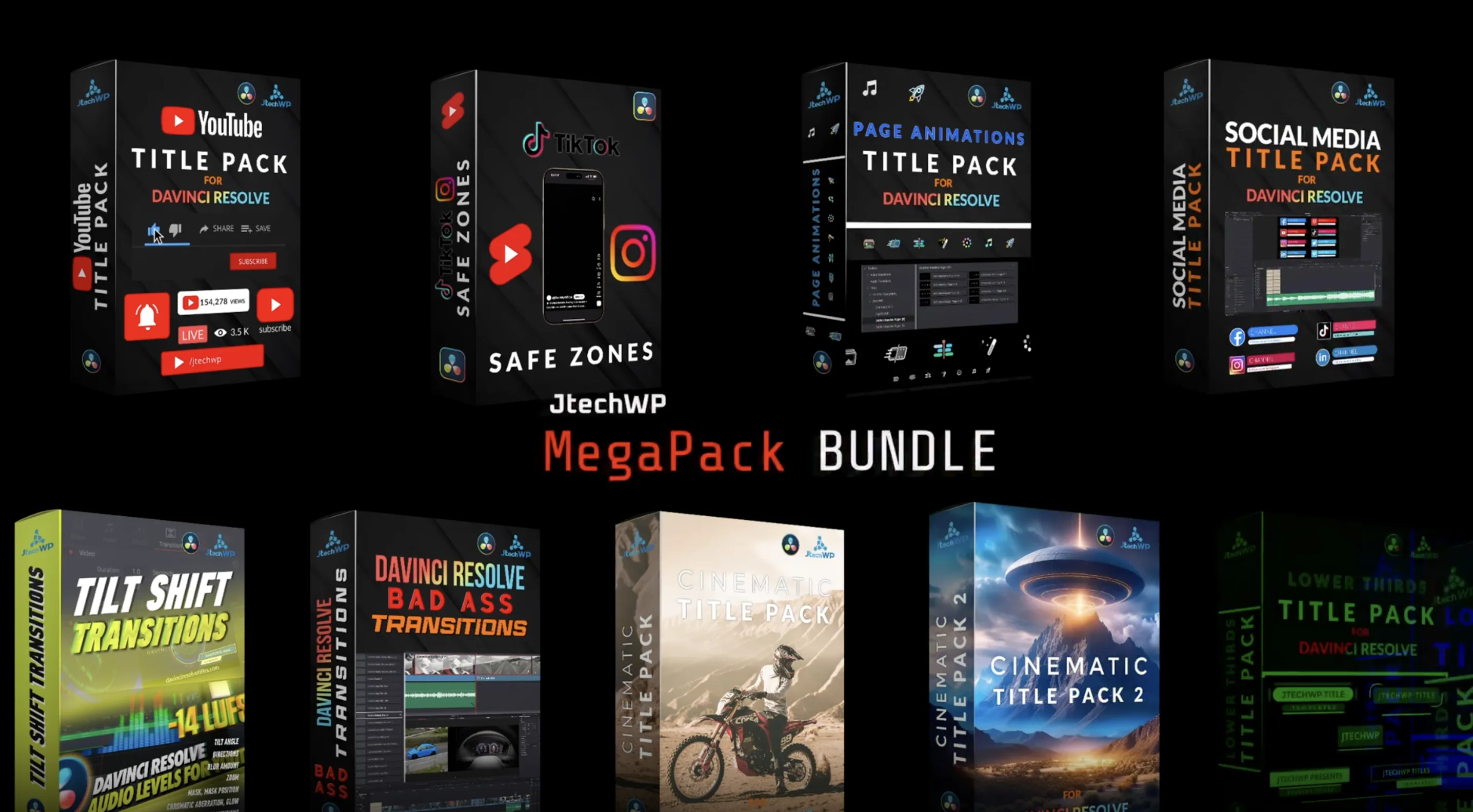
CinemaX Film Titles and the DaVinci Resolve Titles Megapack are both drag-and-drop packs, but they solve different problems. CinemaX is narrow on purpose: 30 titles built around one cinematic look, useful if that specific style is what a project needs and nothing else. The Megapack is broad by design, folding a YouTube title pack, lower thirds, a social media pack, two cinematic packs, transitions, and a safe-zones tool into one purchase, aimed at editors who want one toolkit that covers most formats rather than a single look.
| Feature | Titler Pro 7 | CinemaX Film Titles | DaVinci Resolve Titles |
|---|---|---|---|
| Price | $299 (forever license) | $59 (one-time) | €78.95 Megapack (one-time) |
| Format | 3D title designer, separate window | Drag-and-drop .drfx titles | Drag-and-drop Fusion title/transition packs |
| What is included | 700+ templates: lower thirds, rolling credits, openers | 30 cinematic titles with custom fonts and logos | YouTube, social, cinematic, and lower-thirds title packs, plus safe zones and transitions |
| Customization depth | Full 3D: rotation, lighting, depth-of-field, materials | Standard 2D controls, fully editable | Standard 2D controls, fully editable |
| DaVinci Resolve Free | Yes | Yes | Yes |
| Platforms | macOS, Windows | macOS, Windows, Linux | macOS, Windows |
| Best for | Broadcast and corporate work needing custom 3D titles | A specific cinematic title look for indie film or music video | YouTube and social editors who want one bundle covering titles, lower thirds, and safe zones |
Stop buying plugins. Build your own.
Every plugin you buy solves someone else's problem. Through The Forge skill packs, you can teach Claude Code to write, test, and install custom DaVinci Resolve tools in plain English. Save money, learn the workflow, and own your tools forever.


Our verdict on the best title pack for DaVinci Resolve
Titler Pro 7: the deepest option, at a designer's price
Titler Pro 7 is the only product in this comparison that gives you a real 3D design environment instead of a set of presets. XYZ rotation, multiple light sources, depth-of-field, and normal-mapped materials sit on top of over 700 templates, and the NTX engine keeps playback real-time while editing. The catch is workflow: titles open in a separate designer window rather than living on the timeline, and at $299 for a forever license it costs five times more than the Megapack. It earns that price if you build custom titles often and need the control; if a template with light edits is enough, it is more tool than most projects require.
CinemaX Film Titles: a narrow pack built around one look Runner-up
CinemaX Film Titles does one thing: 30 cinematic titles with the fonts and logos to match, installed with a single .drfx drag-and-drop. There is no designer window and no broader toolkit, just a focused set aimed at indie film and music video work that wants a specific mood out of the box. At $59 it undercuts Titler Pro 7 by a wide margin, but it also covers far less ground than the Megapack: no lower thirds, no safe zones, no transitions, just titles. It is the right pick when the cinematic look itself is the deciding factor, not the breadth of the toolkit.
DaVinci Resolve Titles: the widest coverage for the price Winner
The DaVinci Resolve Titles Megapack is a bundle rather than a single pack: YouTube titles in both orientations, a social media pack, two cinematic packs, lower thirds, a safe-zones tool for TikTok and Reels framing, and two transition packs, all for €78.95. Nothing here matches Titler Pro 7's 3D depth, but for editors who post across YouTube, TikTok, and Instagram, the safe-zones tool alone solves a problem neither of the other two products addresses. It is the pick when the goal is one toolkit that covers most formats rather than one title style done exceptionally well.
For most DaVinci Resolve editors, the DaVinci Resolve Titles Megapack is the best title pack: one purchase covers YouTube, social, and cinematic titles, lower thirds, safe zones, and transitions, at a fraction of what a full designer costs. CinemaX Film Titles is the runner-up, a cheaper and narrower alternative when its specific cinematic look is exactly what a project needs, still with the same simple drag-and-drop install. Titler Pro 7 is the option to reach for only when genuine 3D title design is worth its $299 price and the extra time it takes per title.