What is halation in film photography?
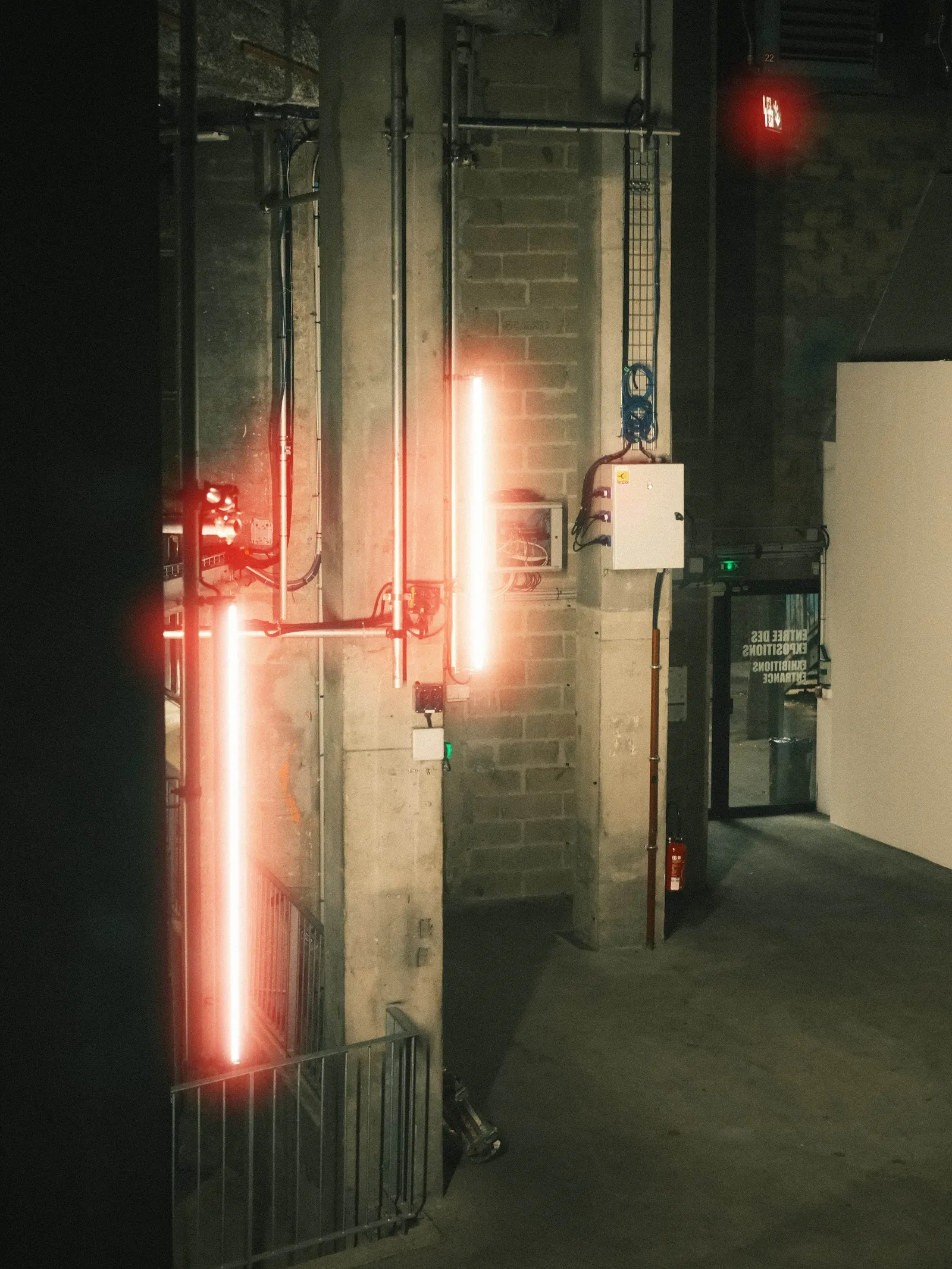
Halation is the soft halo that spreads around bright highlights on film. Light passes through the emulsion, hits the film base, reflects back up, and exposes the emulsion a second time from underneath. That second exposure lands in a ring around the highlight rather than on it, which is why a streetlight on film looks like it is bleeding into the night around it. The word comes from "halo".
On colour negative film the halo reads red or orange. That colour is not a stylistic choice by the manufacturer. It falls out of how the film is built.
Why the halo is red
A colour negative has three light-sensitive layers stacked on top of each other. Light entering the film hits the blue-sensitive layer first, then the green-sensitive layer, and finally the red-sensitive layer, which sits closest to the base.
Light bright enough to punch all the way through and bounce off the base has to travel back up through that stack. The first layer it re-enters on the way back is the red-sensitive one, and it loses energy as it continues upward. So the second exposure is weighted heavily toward red. The halo inherits that bias.
This is also why the effect is far more visible at night or against a dark background. The halo is a faint secondary exposure. Put it next to a bright scene and you will never notice it. Put it next to black, and it is the only thing you see.
The anti-halation layer, and why most film barely shows it
Film manufacturers treat halation as a defect, not a feature. Most stocks include an anti-halation layer: a dyed gelatin undercoat between the emulsion and the base that absorbs light before it can reflect back. The dye washes out during processing, so you never see it on the developed negative.
Motion picture negative goes further. It carries a remjet backing, a carbon black coating on the back of the film that is both anti-static and light-absorbing. Remjet is very effective, and it is also why motion picture stock cannot go through a standard C-41 photo lab: the carbon comes off in the chemistry and contaminates it.
Anyone searching for "antihalation" is usually looking for exactly this layer. It is the thing standing between you and the glow.
Why CineStill 800T glows so much
This is the stock that made halation famous, and the reason is mechanical.
CineStill 800T is a motion picture emulsion converted for still photography, and it carries no remjet backing. CineStill is precise about this and it is worth repeating accurately: the film is not simply repackaged motion picture stock. It uses the same emulsion technology as Kodak's Vision3 tungsten stock, converted for C-41 and rated at 800 ISO with a slightly higher gamma than the motion picture original.
What matters for halation is the backing. CineStill describes remjet as the layer that guards against "light piping, base scratches, static, and halation of highlights", and states plainly that their films do not have it. Removing it is also what lets the film run through a standard C-41 lab, since remjet would contaminate the chemistry.
Without that backing, bright highlights reflect off the base freely and the halo that motion picture stock is engineered to suppress comes back at full strength. The look people chase is a side effect of making the film processable in an ordinary photo lab. The same applies to CineStill 400D, built on a daylight-balanced stock.

Halation on black and white film
Black and white film halates too. Without colour layers there is no red bias, so the halo comes out as a plain colourless glow around highlights. It reads as softness rather than as a coloured bleed, and most photographers never label it halation at all. Films with a grey-dyed base or a strong anti-halation undercoat show almost none.
Halation is not bloom, and not a diffusion filter
These three get used interchangeably and they are three different things happening in three different places.
Halation happens inside the film. The scattering is behind the emulsion, so the glow wraps tightly around highlights and leaves the rest of the frame alone. Contrast elsewhere in the image stays intact.
Bloom, or veiling flare, happens inside the lens. Light scatters between glass elements and coatings, which lifts the whole frame, lowers overall contrast and washes the shadows. It is not confined to the area around a highlight.
A diffusion filter works in front of the lens. It spreads light across the entire image, softening everything at once. It can approximate the mood of halation on a night shot, but the glow does not hug the light source the same way and it costs you contrast across the frame.
The practical tell: if the shadows on the far side of the frame went milky, that is bloom or diffusion. If only the ring around the bright thing glows, that is halation.
Do digital sensors halate?
Not meaningfully. A sensor has a cover glass, a microlens array and photosites, not a stack of emulsion layers over a reflective base. Reflections inside the sensor stack exist and can produce a faint artefact around very bright point sources on some bodies, but it is weak, it is not the same mechanism, and there is no layered emulsion to give it a red cast.
This is the honest reason film simulations struggle with it. Fujifilm's film simulations do a genuinely good job on colour response and tonality, including ACROS for black and white, because those are curves and colour science. Halation is geometry and physics inside a physical material, and there is nothing in a digital capture pipeline that reproduces it as a side effect.

Adding halation to a digital photo
Because it does not happen in camera, it has to be reconstructed afterwards. The recipe is always the same three steps: isolate the highlights above a brightness threshold, blur that isolated layer to set how far the glow spreads, then tint it red and blend it back over the original.
I built a free browser tool that does exactly that, Halation Lab. It runs locally, so nothing is uploaded. I wrote about how I built it and about the first results I got with it, including the threshold and spread values that got closest to the 800T look.
If you grade video rather than stills, the same pipeline works with nodes in DaVinci Resolve, and there is a CineStill 800T halation preset if you would rather start from something ready made.
Common questions
Is halation a defect?
To the manufacturer, yes. Every anti-halation layer and every remjet coating exists to remove it. It became desirable only once photographers started reading the glow as a marker of analog origin.
What is the anti-halation layer?
A dyed gelatin undercoat sitting between the emulsion and the film base, there to absorb light before it can reflect back into the emulsion. It dissolves during processing. On motion picture negative the equivalent is remjet, a carbon black backing on the rear of the film that also handles static and scratch protection.
Is halation the same as lens flare?
No. Lens flare comes from light bouncing between lens elements and usually appears as distinct ghosts, streaks or polygonal shapes somewhere else in the frame, often opposite the light source. Halation is a ring around the highlight itself, created in the film rather than in the lens.
Why is my film halation not red?
Either you are shooting black and white, where there are no colour layers to bias the second exposure, or you are shooting a stock with an intact anti-halation layer, which is most of them.
Can you remove halation from a scan?
Not cleanly. The halo is real exposure recorded in the emulsion, not an overlay. You can reduce how much it reads by pulling down the red channel around highlights, but the information underneath the glow was never captured.
Help me keep writing
If these articles are useful to you, have a look at what I make.

Creator Pro
The ultimate DaVinci Resolve workspace for creators
View plugin — €29.00
VHS Nostalgia
Real VHS & CRT emulation for DaVinci Resolve
View plugin — €49.00
Caption Pro
Automatic word-by-word captions and translation for DaVinci Resolve
View plugin — €49.00
Get the zine
"Absorbed by the algorithm Vol. 1": 33 images shot in Paris, 28 pages, shipped worldwide.